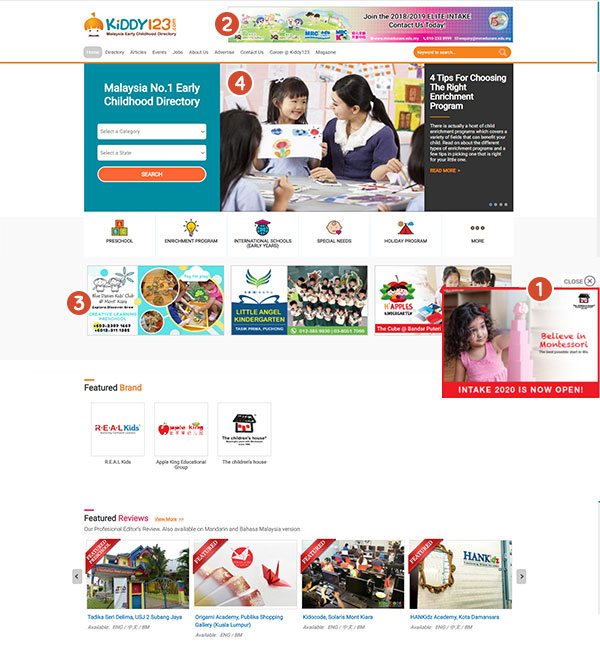
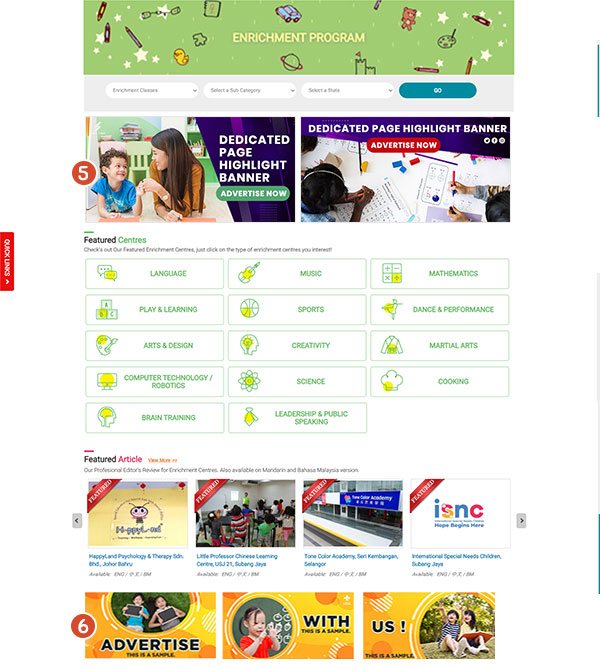
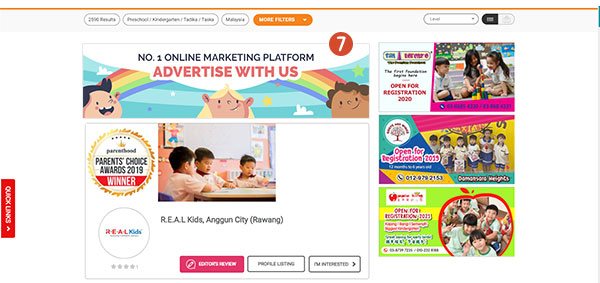
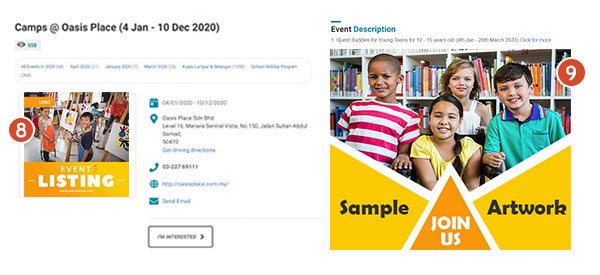
To keep your artwork looking sharp on our site, please follow the sizes below. Every format lists its desktop and mobile artwork, the maximum file size and the file types we accept.
1
Flyout Banner
100% SOV. Only 1 slot available at a time. Banner will slide out on each new visit to the site.
Desktop
400 x 280 px
- Max file size
- 80KB
- Format
- JPG / PNG / GIF
Mobile
440 x 180 px
- Max file size
- 80KB
- Format
- JPG / PNG / GIF
2
Top Banner
Appears on all pages. 3 banner slots available at a time, in sliding motion.
Desktop
728 x 90 px
- Max file size
- 80KB
- Format
- JPG / PNG / GIF
Mobile
400 x 120 px
- Max file size
- 50KB
- Format
- JPG / PNG / GIF
3
Premium Banner
Appears on certain pages. 6 banners available at a time, in sliding motion.
Desktop
350 x 178 px
- Max file size
- 80KB
- Format
- JPG / PNG / GIF
Mobile
400 x 90 px
- Max file size
- 50KB
- Format
- JPG / PNG / GIF
4
Slider Banner
The first slide of the slider banner. Appears on the home page only.
Desktop and mobile
560 x 380 px
- Max file size
- 80KB
- Format
- JPG / PNG
5
Dedicated Page Highlight Banner
Appears only on its own category page: Preschool, Enrichment Program or International School. 2 slots per category at a time.
Desktop
500 x 250 px
- Max file size
- 150KB
- Format
- JPG / PNG / GIF
Mobile
400 x 200 px
- Max file size
- 150KB
- Format
- JPG / PNG / GIF
6
Dedicated Page Featured Banner
Appears only on its own category page: Preschool, Enrichment Program or International School. 6 slots per category.
Desktop
350 x 175 px
- Max file size
- 80KB
- Format
- JPG / PNG / GIF
Mobile
400 x 90 px
- Max file size
- 80KB
- Format
- JPG / PNG / GIF
7
Category Search Banner
Appears at the top of the search directory results, for one main category and one state. 2 slots per main category.
Desktop
700 x 180 px
- Max file size
- 100KB
- Format
- JPG / PNG / GIF
Mobile
400 x 120 px
- Max file size
- 80KB
- Format
- JPG / PNG / GIF
8
Event Listing Thumbnail Image
The image that fronts your event in the events list.
Desktop and mobile
300 x 300 px
- Format
- JPG / PNG
9
Event Listing Description Artwork
The poster inside your event page.
Desktop and mobile
706 x 1000 px
- Format
- JPG / PNG
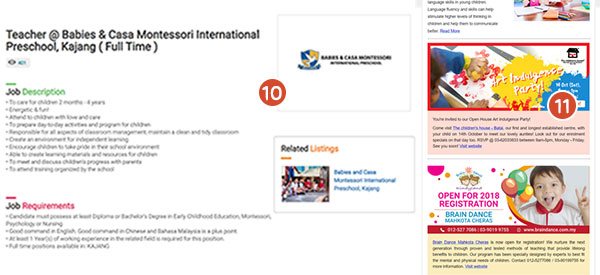
10
Job Listing Thumbnail Image
The image that fronts your vacancy in the jobs list.
Desktop and mobile
300 x 300 px
- Format
- JPG / PNG
11
E-Newsletter Banner Insertion
Placed inside the monthly newsletter that goes to our parent list.
Desktop and mobile
500 x 250 px
- Format
- JPG / PNG
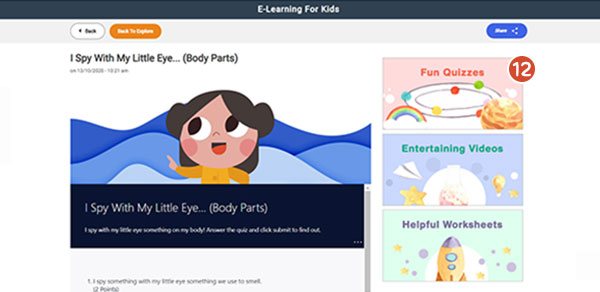
12
E-Learning Page Banner
Appears on every E-Learning detail page. 3 slots available at a time.
Desktop
350 x 178 px
- Max file size
- 80KB
- Format
- JPG / PNG / GIF
Mobile
400 x 90 px
- Max file size
- 50KB
- Format
- JPG / PNG / GIF